Building a Workspace That Works: Structure, Flow, and Function
Updated: May 18
A workspace doesn’t need to be large to be effective. It doesn’t need to look perfect or follow a specific design trend.
But it does need to work.
In many environments—garages, workshops, sheds, and utility spaces—the challenge isn’t a lack of tools or equipment. It’s that the space itself doesn’t support how work actually happens.
Tools are available, but not where they’re needed. Surfaces exist, but aren’t usable.
Storage is present, but not practical. As a result, even simple tasks require extra steps, extra time, and extra effort.
The difference between a space that feels frustrating and one that feels efficient isn’t how it looks. It’s how it’s structured.
The Problem: When Workspaces Create Friction
Many workspaces develop without a clear plan. Items are added as needed, storage is created wherever space allows, and layout decisions are made over time rather than intentionally.
This often leads to environments where:
tools are stored far from where they are used
work surfaces are cluttered or shared between unrelated tasks
frequently used items are difficult to access
movement within the space is inefficient
These issues create friction.
Friction shows up as:
time spent setting up before work can begin
interruptions during tasks to retrieve missing items
repeated cleanup or rearranging
hesitation to start projects at all
Over time, the workspace becomes something that needs to be managed instead of something that supports the work.
The Shift: Designing for Function First
A functional workspace is not defined by appearance. It is defined by how easily work can move from one step to the next.
This requires a shift in focus.
Instead of asking:
“How should this space look?”
The question becomes:
“How should this space work?”
This leads to decisions based on use rather than aesthetics.
The goal is not to create a perfect layout, but to create one that reduces effort and supports consistent use.
The Foundation: Three Core Zones
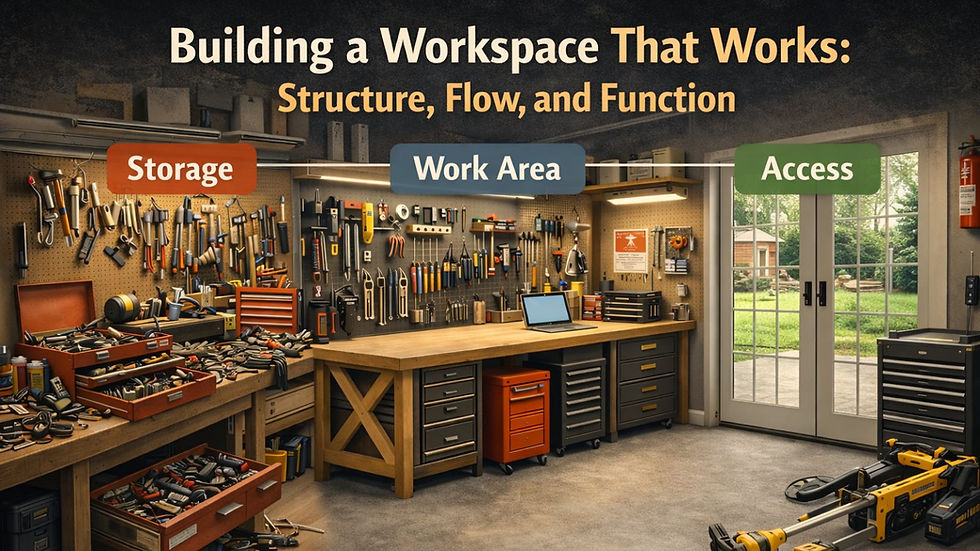
Most effective workspaces—regardless of size or purpose—are built around three simple zones:
storage
work area
access
These zones don’t need to be large or complex, but they do need to be clearly defined.
Storage: Where Things Live
Storage is more than just placing items out of the way. It defines where tools and materials belong when they are not in use.
Effective storage:
groups similar items together
keeps frequently used tools within reach
uses visible or easy-to-access solutions
When storage is aligned with how items are used, it becomes easier to maintain.
Poor storage, on the other hand, leads to:
misplaced tools
cluttered surfaces
repeated reorganization
Work Area: Where Tasks Happen
The work area is the center of the workspace. It should support the task at hand without requiring constant adjustment.
A functional work area:
has a clear, usable surface
is free from unrelated items
allows tools to be used safely and efficiently
When the work area is cluttered or shared between too many purposes, tasks become harder to complete.
Keeping this space clear and intentional improves both efficiency and results.
Access: How Movement Happens
Access is often overlooked, but it plays a critical role in how a workspace functions.
It includes:
the ability to reach tools easily
the ability to move between zones without obstruction
the ability to retrieve and return items without disruption
When access is restricted:
tasks slow down
tools are left out instead of returned
the workspace becomes harder to maintain
Clear pathways and easy reach reduce these issues and support smoother workflows.
Reducing Friction in Everyday Use
A well-designed workspace minimizes friction at every stage of a task.
This doesn’t require complex systems. It requires small, intentional decisions that remove unnecessary steps.
Keep Frequently Used Items Close
Tools that are used regularly should be stored near the work area.
This reduces the need to move back and forth and keeps tasks focused.
Separate Tasks When Possible
When different types of work share the same space, they can interfere with one another.
Even in smaller environments, creating subtle separation between tasks helps maintain order and reduces overlap.
Design for Setup and Cleanup
Every task has a beginning and an end.
A functional workspace makes both easier by:
reducing setup time
making it simple to return tools to their place
This supports consistency and prevents clutter from building over time.
Avoid Overloading the Space
Adding more storage, tools, or surfaces does not always improve a workspace.
In many cases, it creates more complexity.
Focusing on what is actually used—and removing or consolidating what isn’t—keeps the space efficient.
Adapting Across Environments
The principles of structure, flow, and function apply across different types of workspaces.
Garage and Workshop Settings
In garages and workshops, tools and equipment are often the primary focus.
Applying systems here means:
organizing tools by function
keeping work surfaces clear
ensuring easy access to frequently used items
This supports both small tasks and larger projects.
Outdoor and Utility Spaces
Sheds and outdoor work areas present unique challenges, including limited space and changing conditions.
Simple systems—such as grouping tools, protecting equipment, and maintaining access—can make these spaces far more usable.
Multi-Use Environments
Many workspaces serve more than one purpose.
In these cases, structure becomes even more important.
Defining zones and maintaining clear boundaries helps prevent overlap and keeps the space functional.
Simple Principles for a Better Workspace
Across all environments, a few principles consistently improve how a workspace functions:
Design around use, not appearance
Function should guide decisions.
Keep zones clearly defined
Even small spaces benefit from structure.
Make access easy
Tools that are easy to reach are easier to use and return.
Reduce unnecessary movement
Keeping tools close to where they are used saves time and effort.
Maintain consistency
A workspace works best when it functions the same way every time.
Building a Workspace That Supports the Work
A well-designed workspace doesn’t just hold tools. It supports the way work is done.
It reduces friction, improves flow, and makes tasks easier to start and complete.
Over time, this leads to:
more efficient use of tools
less time spent managing the space
better overall results
The goal is not to create a perfect environment. It is to create one that works—consistently, practically, and with less effort.
When structure, flow, and function are aligned, the workspace becomes an asset instead of an obstacle.